It goes without saying that nobody would fail to become angry at a non-working toilet or office accessory that fails to react even after several attempts to wave your hand at it, or that continues working automatically. Being a basic amenity nowadays, an
automatic paper dispenser is supposed to provide certain convenience. Unfortunately, some technical difficulties may sometimes happen, including dust accumulation, battery discharge, and damaged sensors.
It is essential to know how to solve these problems in order to save costs on maintenance and to ensure correct functioning of the bathroom. It is required to determine the nature of the problem first, and one may use the chart below for this purpose.
Quick Troubleshooting Guide
| Issue |
Potential Causes |
Primary Solution |
| Sensor Not Responding |
Dirty lens, low battery voltage, strong light interference |
Clean sensor window, replace batteries |
| Frequent Paper Jams / Tearing |
Non-standard paper roll, improper loading, paper dust build-up |
Clear jam, verify roll dimensions and clear rollers |
| Continuous "Ghost" Dispensing |
Reflective surfaces below, interior moisture |
Adjust mounting height, clean internal circuit area |
| Total Power Loss |
Corroded battery contacts, loose DC adapter plug |
Wipe contact terminals, check power connection |
1. Sensor Not Responding: Causes and Solutions
The problem when an automatic paper dispenser becomes unresponsive to hand movements usually originates from issues with power supply or optical obstruction, not motor failure.
Causes:
- Dust, soap spray, or water drops blocking the infrared sensor lens.
- Low battery voltage, which makes the internal motor fail to activate.
- Too much sunlight or other forms of light disrupting the infrared signals.
Troubleshooting Steps:
Step 1: Clean the sensor window with a soft, dry microfiber cloth to remove dust particles.
Step 2: Open the device cover and replace the low-voltage batteries with a new set of high-quality alkaline batteries with the correct polarity.
Step 3: Change the position of the device from its current position to somewhere else if it is near the window or bright walls.
2. Solving Paper Jams and Cutting Problems
One of the most common problems that building occupants and janitors experience is paper jams.
Causes:
- The use of paper rolls exceeding the recommended width or diameter.
- Misaligned roll installation where paper isn't properly seated into the drive roller channels.
- Paper dust buildup within the internal blades of the cutting mechanism due to continuous use.
Step-by-Step Fixes:
Step 1: Release the front cover and remove any torn paper pieces. Do not pull hard in order not to strip the internal gears.
Step 2: Ensure that the new paper roll you purchased meets the specified requirements of thickness and weight for your machine.
Step 3: Remove the paper dust in the blade region and ensure that the paper feeding mechanism can rotate smoothly manually.
3. Fixing Continuous Feeding or "Ghost" Dispensing
If the unit dispenses paper without anyone approaching it, unnecessary paper waste and operational disruptions can occur.
Causes:
- Shiny surfaces on the countertop, sink, and floor tiles directly below the unit reflect infrared light to the sensor.
- Dampness or condensation within the unit can give rise to minor short-circuit symptoms on the circuit board.
Step-by-Step Solution:
Step 1: Inspect the distance between the lower sensor and the reflective surface. Elevate the unit, if required, to prevent any reflection problems.
Step 2: Disconnect, disassemble, and clean any dampness present in the sensor chamber using a dry cotton swab.
4. Lack of Power and Battery Box Maintenance
When an automatic paper dispenser stops working altogether with no lights coming from its indicator, chances are that there is no current coming to the motherboard.
Causes:
- Corrosion of spring terminals caused by moisture in washrooms.
- A loose plug or broken transformer when using either a hard-wired or DC plug-in power adapter.
Step-by-Step Solution:
Step 1: Check for any white or greenish color of corrosion on the battery contacts. Remove any residue and clean the terminals with an alcohol wipe.
Step 2: In case of connection to an external power source, test the adapter output voltage to ensure constant power flow.
5. Preventive Maintenance Tips
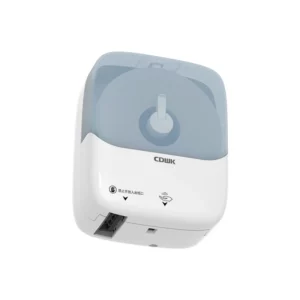
Well-developed hardware always needs basic servicing in order to provide proper functioning through many years of intensive operation. Thus, even advanced devices such as commercial
CDWK CD-8088 auto paper towel dispenser that includes specific sensors calibration and auto-cut technology, designed for high-volume locations, require regular inspections to prevent potential damage.
Developing a basic monthly maintenance plan is quite effective. Just clean the outside optical window, remove dust particles from the paper cutting zone, and replace batteries before their complete depletion.
Conclusion
Routine inspection and basic troubleshooting is the main thing which allows maintaining functioning of touchless hardware in good condition. Most of the problems associated with sensor malfunction, paper jams, and defective power contacts of automatic paper dispensers can be easily eliminated by means of basic maintenance methods. Creating cleaning schedules, testing paper roll compatibility, and drying the internal parts of the device will contribute to its service life extension and efficient work performance.
0